What are Credit Packs?
Last updated: June 1, 2026
Credit Packs are offered by together.ai as a 'pay as you go' method of using our services. Once your purchase has gone through, the amount will be added to your balance and will decrease in real time as you use our API and other services.
How can I buy Credit Packs?
You can purchase credits through your accounts billing settings just click + Add Credits In the Balance panel:

Then type your desired amount (minimum $5):
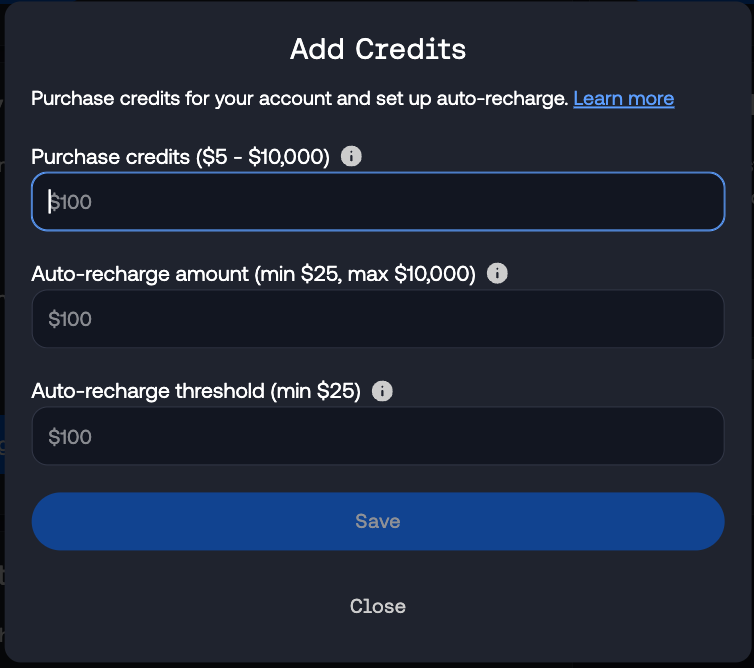
You can also set up recurring (recharge) billing through the add credits modal.
If you fill in these fields, your payment method will automatically be charged for the Auto-recharge amount that you specify when your account balance drops to the Auto-recharge threshold.
Note: Together AI only accepts major credit and debit cards from networks like Visa, Mastercard, and American Express that support recurring payments and are directly tied to a bank account. Virtual cards and prepaid cards are not supported and may result in the error "Your card does not support this type of purchase." Some banks may impose restrictions on recurring payments, which could prevent successful purchases. During the purchase process, your bank may show a $0 authorization hold to verify your card is active - this is normal, simply approve this hold and your actual credit purchase amount will be charged afterward.
Finally, click purchase to buy the credits using your accounts saved card details:

Purchasing credits with ACH (US bank account)
If your default payment method is a linked US bank account (ACH), you can purchase credits the same way as with a card:
Go to your billing settings
Select Add Credits in the Credits Balance block
Enter an amount (up to $100,000) and confirm
Important: Credits are not deposited until the ACH payment clears. Settlement usually takes 1–3 business days, but can take longer depending on your bank. Until then, the purchase shows as pending and your balance will not increase.
If the payment fails, no credits are deposited. Contact Support if you need help with a failed transaction.
Auto-recharge
If you set up auto-recharge, your default payment method is charged when your balance falls below your threshold. Auto-recharge requires a credit or debit card as your default payment method—it is not available when ACH is your default. See our auto-recharge article for details.
Troubleshooting Credit Pack Purchases
If you're having trouble purchasing credits or the system keeps asking for your card details, try these solutions:
Verify card details: Ensure your card is active, not expired, and all details are entered correctly (number, expiration date, CVV, and billing address)
Check available funds: Confirm sufficient funds are available on your account
Bank authorization: Check for any bank authorization requests or notifications that need approval
Wait for processing: Credit purchases can take up to 15 minutes to complete. Avoid re-entering card details during this time
Card restrictions: Check for spending limits or blocks on your card that might prevent the transaction
If issues persist after trying these steps, contact our support team through the form on this page, or the dashboard chat.
Can I use credits to pay off an outstanding invoice?
Credits are billed separately to usage, so once a usage bill has been finalized credit purchases won't count against it. You will need to pay the usage invoice separately.
Can I use credits to reduce my bill at the start of next month?
Yes! Invoices for usage are based on your accounts credit balance at the end of the month. Any credit packs purchased during the month will count against that balance. Reducing your future bill.
How can I track my credit usage?
To monitor your credit usage and see how much you've spent on API calls:
Go to your account settings by clicking on your account icon dropdown menu in the top right corner and selecting "Settings"
Select "Billing" from the sidebar in the account settings menu
In the billing section, you can view your current monthly spend as well as review past invoices.