How to Regenerate my API Key
Last updated: August 29, 2025
If your API Key is ever compromised, or if you need to change the API Key you are using, this can be done in the API Keys section of your Together.AI account:
Once you are here, click on the triple dot button and click on "Regenerate API key"
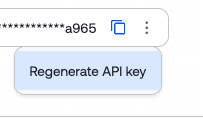
This will immediately cancel the existing key (rendering it unusable) and display a new API Key to be used moving forward.